RealPage Commercial Property Management Software Integration (Commercial Accounting)
Summary
The RealPage Commercial Accounting Platform is a fully integrated solution for linking middle and back-office operations to drive transparency and efficiency in all activities related to the lifecycle of the portfolio and asset. Through our integration with Commercial Property Management software, you can import your information to FUEL and work on your models!
How does it work?
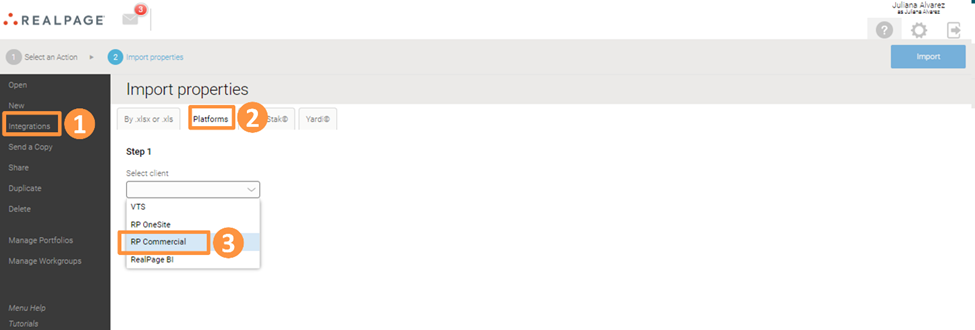
From the Homepage, go to Integrations and then click on the Platforms tab. Next, select RP Commercial in the drop-down:
Select the property you want to import and determine the purchase and sale date. You can see a preview of your information by selecting the following buttons: Rent Roll, Operating Expenses, and Capital Expenses. Once you are finished, you can select Import in the upper right corner:

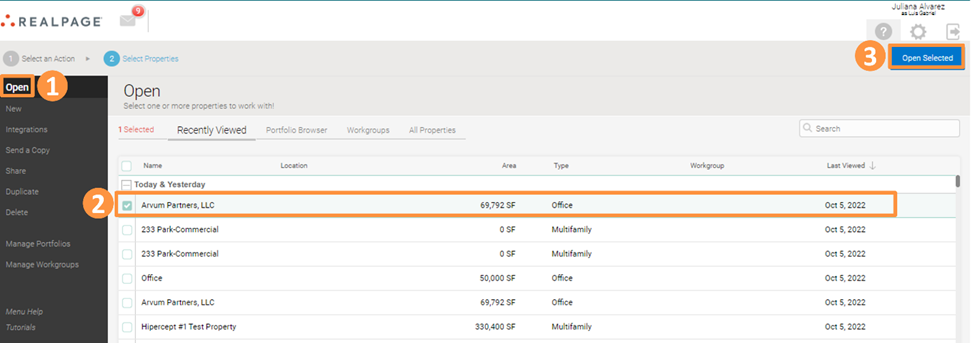
To see the property imported, go to the Home Screen and click on Open. From here, select the imported property and click on Open Selected:
How do I get started?
To use RealPage Commercial Accounting software with FUEL, please reach out to the Support Team at fuelsupport@realpage.com or Submit a Request!